Loan instalments leave the bank at one amount while the plan in Logo shows another.
How do you track bank loan instalments correctly in Logo?
Tracking a bank loan correctly means comparing Logo's plan, the amount the bank collected and the repayment schedule at every instalment, seeing the difference (usually BSMV or exchange rate) at once, and posting the instalment split into principal, interest and BSMV. iyibir Finance reads all three sources together and shows the difference on instalment day.
Why it happens
- The BSMV the bank collects was calculated differently in Logo's plan.
- The instalment is posted as one line; principal, interest and tax are not separated.
- The currency effect on foreign currency loans is not tracked separately.
- Remaining principal and the next instalment require a look at the bank screen every time.
How it is generally solved
Keep the plan in one source
Match the loan's repayment schedule with the Logo record and the bank's plan.
Compare on instalment day
Compare the amount collected by the bank with the plan on the same day.
Split the voucher
Post the instalment as separate lines for principal, interest and BSMV.
See the remaining load
Track remaining principal, the next instalment and the currency effect on foreign currency loans.
With iyibir Finance
- Each loan is read from Logo, the bank and the repayment schedule document; the three check each other.
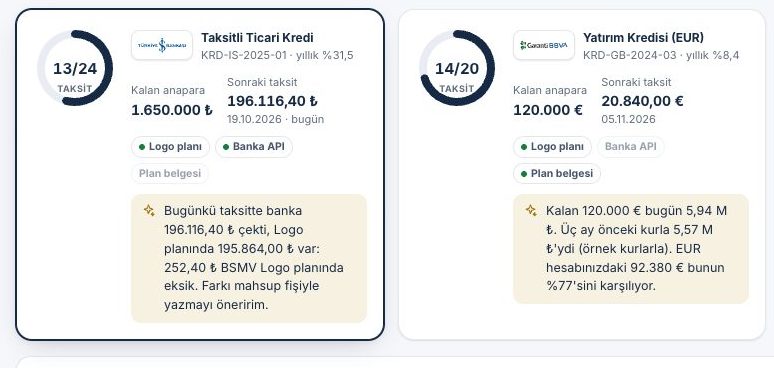
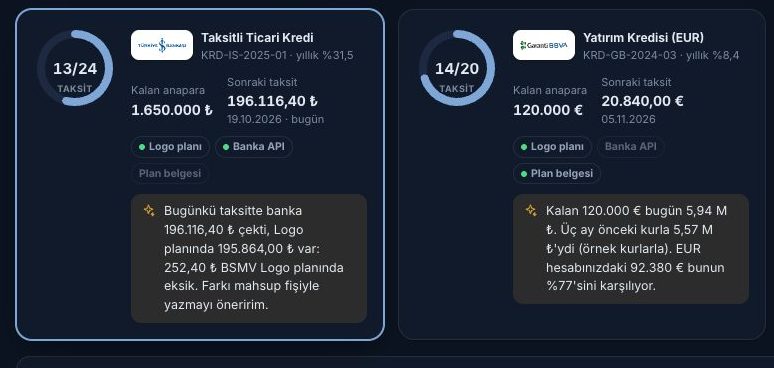
- Remaining principal, next instalment and progress appear on one card; when the bank collects an instalment, the transaction is matched to the loan.
- The agent catches the difference between the BSMV the bank collected and Logo's plan.
- The instalment voucher is split into principal, interest and BSMV and posted with your approval; the currency effect on foreign currency loans is visible.
Frequently asked
How is the BSMV difference shown?
On instalment day the amount collected by the bank and the amount in Logo's plan appear side by side, and the difference is explained in one sentence.
Is leasing tracked too?
Yes. Leasing contracts and rent schedules are read from Logo or the schedule document; rent days appear in the cash forecast.
Where do letters of guarantee live?
Issued and received letters sit in the wallet with their due dates and commission periods; a letter not returned after the job is done raises an alert and a draft return request.
Other problems
How do you post bank transactions to Logo without keying them in?
Agents read the transactions overnight, match them to accounts and prepare the voucher batch; in the morning you only approve.
How to fix itWhy does the bank balance in Logo not match the bank, and how do you reconcile it?
Logo and the bank are compared both ways; a balance bridge shows the gap item by item.
How to fix itHow do you keep track of cheque and promissory note due dates?
Cheques are scanned with a phone, the portfolio sits on a due-date calendar, and the agent suggests endorsing or collecting.
How to fix it